Schema CLI Overview
Use the chkit CLI to define ClickHouse schemas in TypeScript or Python, generate and review migration SQL, deploy changes, and check for drift.
Commands
Section titled “Commands”| Command | Description |
|---|---|
chkit init | Scaffold a new project with config and example schema |
chkit generate | Diff schema definitions against the last snapshot and produce migration SQL |
chkit migrate | Apply pending migration files to ClickHouse |
chkit status | Show migration status (total, applied, pending, checksum mismatches) |
chkit drift | Compare snapshot against live ClickHouse and report differences |
chkit check | Run policy checks for CI gates (pending, checksums, drift, plugins) |
chkit snapshot | Rebuild snapshot.json from schema definitions, for example after a merge conflict |
chkit query | Run an ad-hoc SQL query against the configured target |
chkit pull | Introspect live ClickHouse and generate a schema file |
chkit codegen | Generate typed row models from schema definitions |
chkit plugin | List or run plugin commands |
Connection requirements
Section titled “Connection requirements”Generate migrations from local files without a database connection. The starter schema still requires an explicitly chosen CLICKHOUSE_DB namespace. Preserve supplied target metadata during generation so cluster and engine settings remain consistent. Configure a ClickHouse connection to apply migrations or inspect a live database.
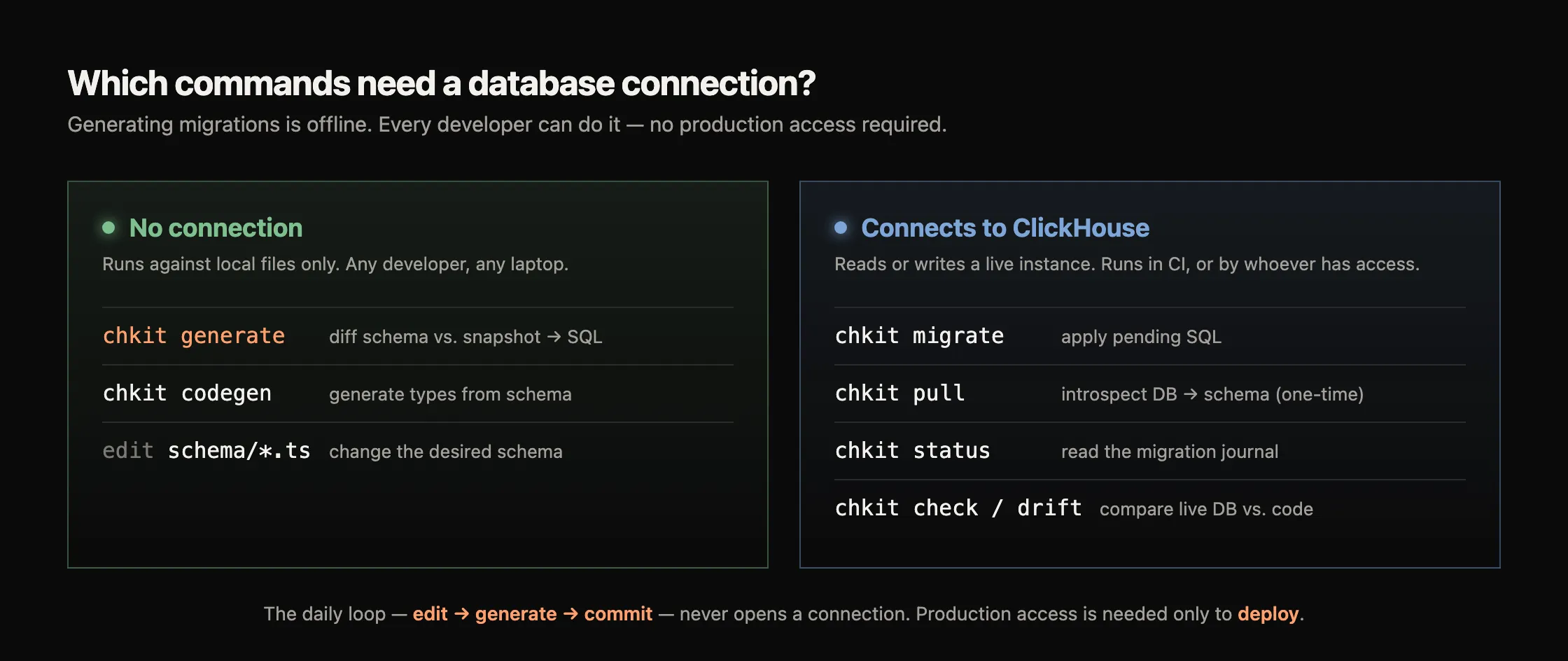
| Needs a connection | Offline |
|---|---|
migrate (apply SQL), pull (introspect), status (read journal), check / drift (compare live DB to code) | generate (diff schema vs. snapshot), snapshot rebuild (rewrite the snapshot from schema), codegen (types from schema), editing schema files |
Typical workflow
Section titled “Typical workflow”chkit init # scaffold config + example schema# Set CLICKHOUSE_DB to the intended namespace before generation.chkit generate --name init # produce migration SQL + snapshot# Supply the remaining connection values before connected commands.chkit migrate --json # inspect the pending plan without applyingchkit migrate --apply # apply reviewed migrations to ClickHousechkit status # verify migration statechkit check # CI gate: pending, checksums, drift, pluginsGlobal flags
Section titled “Global flags”These flags are available on every command that loads a config file:
| Flag | Type | Default | Description |
|---|---|---|---|
-c, --config <path> | string | clickhouse.config.ts / clickhouse.config.py | Path to the chkit config file |
--json | boolean | false | Emit machine-readable JSON output |
-h, --help | boolean | n/a | Show built-in help without evaluating project config |
--help-plugins | boolean | n/a | Include configured plugin flags; evaluates config/plugin registration but skips lifecycle hooks |
-v, -V, --version | boolean | n/a | Print CLI version |
Both CLIs accept the same short forms: the ones in these tables, -t for --table, generate -n, pull -o/-d/-f and init -y. A short flag takes its value as -t events, -t=events or -tevents. Short flags cannot be bundled: -fo out.ts is an unknown flag. -v/-V work only before a command. Any other short flag, such as -x, is rejected as an unknown flag, the same as an unknown long flag. Before the config is loaded, chkit does not know which flags its plugins add, so a plugin flag value that starts with -c (--tag -critical) reads as --config, and on the commands that take --table one that starts with -t reads as --table; write it with = (--tag=-critical). Given more than once, --config keeps the last path: -c a.ts --config b.ts loads b.ts.
Table scope
Section titled “Table scope”-t, --table <selector> narrows a command to matching tables: an exact name or a trailing wildcard prefix, such as events_*. Only the commands it scopes take it:
generate,migrate, anddriftuse it to narrow the schema/migration operations they plan or evaluate.checkapplies it only to its drift and plugin checks; the pending-migration and checksum checks still run across all tables, sochkit check --table app.userscan still fail on an unrelated pending migration.snapshot rebuildrejects it: a rebuild always rewrites the whole snapshot.
Every other command, including status, query, codegen, pull and chkit plugin <name> <command>, rejects it as an unknown flag instead of running unscoped. A plugin command takes it only when the plugin declares a --table flag.
Environment variables
Section titled “Environment variables”These environment variables affect every command:
| Variable | Description |
|---|---|
CHKIT_DEBUG | Set to 1 or true to emit structured debug logging to stderr. Covers config loading, command dispatch, plugin lifecycle hooks, ClickHouse queries with timing, journal operations, and per-command details. |
CHKIT_JOURNAL_TABLE | Override the name of the migration journal table (default _chkit_migrations). See chkit migrate. |
Read debug logs from stderr and --json output from stdout:
CHKIT_DEBUG=1 chkit migrate --applyRelated pages
Section titled “Related pages”- First-schema tutorial — complete the schema workflow from an empty folder
- Migration workflow — understand snapshots, SQL files, and the migration journal
- Configuration — select schema files and a database connection
- Schema plugins — import live schemas and generate row models